
Home / news
News
Why Can IT Migration Be a Shortcut to Digital Transformation?
The Increasing Complexity of IT Management
Many companies today face challenges in managing increasingly complex IT infrastructures. Applications are becoming more diverse, data volumes continue to grow, and user needs are changing faster than ever before. Traditional on-premise infrastructures are often unable to keep pace with these rapid changes.
On the on-premise side, in order to increase capacity, companies must purchase new servers, set up additional storage, and add software licenses. All of this not only takes time and money, but also reduces business flexibility. As the scale of the business grows, the challenges faced become even greater: downtime, decreased system performance, capacity limitations, and high security risks. Often, this procurement process takes weeks or even months.
This complexity has led many companies and organizations to seek new solutions. Most of them want to break out of the cycle of high costs, limited scale, and slow innovation. The answer that has emerged is migration to a trusted public cloud. According to AWS, cloud migration is the process of moving digital assets such as data, applications, and IT infrastructure from on-premises data centers to cloud infrastructure. This process cannot be done carelessly; it requires careful planning, the right migration strategy, and testing to ensure that business operations are not disrupted (source: https://aws.amazon.com/what-is/cloud-migration/). Cloud migration is no longer just a trend. It has now evolved into a digital transformation strategy that helps many companies and organizations simplify IT complexity while paving the way for innovation.
Why is Migrating to the Cloud Important?
Initially, many companies or organizations only used the cloud for new or non-critical applications. However, over time, they discovered the enormous benefits of updating (if necessary) and migrating legacy applications and systems to the public cloud as well. There are five main reasons why migration is a strategic move.
1. Cost Efficiency
- The cost of building and maintaining a data center is not insignificant. Companies or organizations, as mentioned in the Introduction above, must purchase servers, storage, network devices, pay for electricity and cooling, and hire an operational team. Migrating to the cloud cuts these costs. There is no longer a need for large-scale hardware procurement. With the Pay-As-You-Go model (Ref. Article 1 - Flexible IT Infrastructure: From Burden to Advantage - link to Article 1 can be inserted), companies only pay for the resources they use. If the server runs for 10 hours, then only 10 hours are paid for. If traffic decreases, capacity will automatically decrease, so costs will also decrease. In addition, migration frees operational teams or experts from routine tasks such as replacing frequently damaged hard disks or updating software (server firmware).
2. Dynamic Scalability
- One of the advantages of the cloud is its almost unlimited scalability. Companies can increase capacity when traffic spikes and reduce it again when conditions return to normal. Take an e-commerce company during the Harbolnas event, for example. With traditional infrastructure, servers could crash due to a thousand-fold increase in traffic. With the cloud, capacity automatically increases, and once traffic returns to normal, capacity decreases again. There are no more idle servers weighing down costs.
3. Enhanced Security
- Many people think that moving data to the cloud means losing control over security. The fact is that public cloud providers such as AWS invest billions of dollars in security, as stated by AWS CISO, “the culture that Security is Job Zero, https://aws.amazon.com/blogs/enterprise-strategy/security-at-aws/”. The shared responsibility model (https://aws.amazon.com/compliance/shared-responsibility-model/) is clear. AWS secures the cloud infrastructure, while customers manage data configuration and access. With this combination, data is actually more secure than if it were left in a server room with a physical key.
4. Performance and Reliability
- Migrating to the cloud provides access to the latest server and network technologies. Applications run faster, latency is reduced, and users enjoy a better experience. With data centers spread across the globe, users access content from the nearest location. This increases business productivity and competitiveness.
5. Sustainability
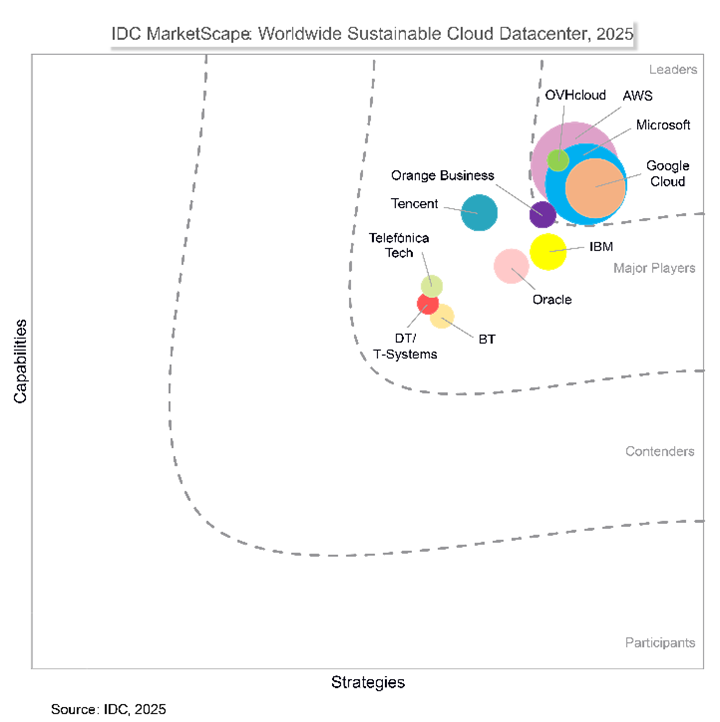
- Public Cloud also helps companies/organizations become more environmentally friendly. Its large scale allows AWS to use energy-efficient devices and advanced cooling technology. Compared to thousands of companies building their own data centers, this model is much more efficient and reduces the pollution footprint (source: https://aws.amazon.com/sustainability/).
This model makes IT costs very dynamic. There is no longer a concept of “buying excess servers just in case.”
Migration Strategy: The 7Rs You Need to Understand
Not all applications can be migrated to the cloud in the same way. AWS introduces 7 migration strategies (7R) that can serve as a guide.
1. Rehosting (Lift and Shift)
- Move the application as-is to the cloud without major changes. Fast and simple, suitable for initial migration.
2. Relocating (Lift and Optimize)
- Similar to rehosting, but after relocation, the application is optimized using cloud services, for example, moving from a VM to a database managed by AWS, such as RDS (Relational Database Services).
3. Refactoring
- Redesign the application to take full advantage of cloud capabilities. Suitable for applications that want to scale or add new features.
4. Replatforming (Lift, Tinker, Shift)
- A combination of rehosting and refactoring. There are certain optimizations, such as moving the database to a cloud service with machine learning-based automation.
5. Repurchasing
- Replacing old applications with cloud-based applications. For example, moving from on-premises VDI to native cloud VDI.
6. Retiring
- Mematikan aplikasi yang sudah tidak dibutuhkan. Dengan begitu, perusahaan bisa mengurangi biaya dan kompleksitas.
7. Retaining (Revisiting)
- Delaying migration for certain applications. This is usually because the application has just been updated or there are still regulatory reasons.
Types of Cloud Migration
Migration can take various forms, depending on your needs:
- • Database Migration – moving databases to the cloud, with data replication to minimize downtime.
- • Application Migration – moving applications from on-premises to the cloud, which can involve rehosting, replatforming, or refactoring.
- • Hybrid Migration – part of the system remains on-premises, while part is moved to the cloud. Suitable for gradual transitions.
- • Data Center Migration – moving the entire data center infrastructure to the cloud. Complex, but greatly reduces operational costs.
- • Cloud-to-Cloud Migration – moving workloads between cloud providers, for example, because of lower costs or more suitable services.
AWS Migration Best Practices
The PAYG model supports the six pillars of the AWS Well-Architected Framework:
1. Assessment
- Companies/organizations must understand their current IT environment. Identify existing applications, data, and workloads. Determine priorities, costs, and potential savings.
2. Mobilize
- Form a core migration team, create a detailed plan, prepare the cloud environment, and run a pilot migration to test the strategy.
3. Migrate and Modernize
- After a successful trial, begin large-scale migration. Optimize the application architecture to suit cloud services. Monitoring is performed for security, performance, and cost.
Migration is not a one-time step, but a continuous process that is constantly updated in line with technological developments.
Use Case: ERP Migration in a Manufacturing Company
A large manufacturing company in Indonesia runs ERP (Enterprise Resource Planning) in an internal data center. This ERP system is critical because it supports production, finance, and distribution. However, at the end of each month during the financial closing process, the system often slows down due to insufficient server capacity.
After migrating to AWS:
- • The ERP database was moved to Amazon RDS.
- • The ERP application runs on Amazon EC2 with ASG enabled.
- • Data backups are stored directly in Amazon S3, which guarantees 11 nines (99.999999999%) durability.
As a result, ERP performance has improved dramatically. The month-end financial reporting process, which used to take hours, can now be completed much faster. Downtime has been reduced, capacity is no longer an issue, and the IT team can focus on innovation rather than just putting out infrastructure fires.
Use Case 2: Business Application Smoothness for Financial Companies
An insurance company faced challenges in maintaining disaster recovery (DR). They had a backup data center, but the operational costs were high.
Migrating to AWS provided the solution:
- • The main system remains in the local data center.
- • The backup system is moved to AWS with AWS Elastic Disaster Recovery (DRS).
- • DR tests (Drill Tests) can be conducted more frequently or according to an agreed schedule, at a much more measurable cost.
Now, the company has a more robust DR, with better RPO (Recovery Point Objective) and RTO (Recovery Time Objective), without the high costs of maintaining a backup data center.
Migration Challenges and How to Overcome Them
Migration certainly comes with challenges:
- • Technical complexity: For interconnected applications, migration cannot be partial.
- • Scalability: Large data requires a replication strategy so as not to disrupt business.
- • Skill gap: Internal teams need to learn cloud technology.
AWS offers a variety of native tools to help:
- • Application Discovery Service – maps source servers.
- • Application Migration Service (MGN) – automates rehosting.
- • Database Migration Service (DMS) – fast and secure database migration.
- • DataSync – move files/data between systems.
- • Migration Acceleration Program (MAP) – a proven methodology for accelerating and securing the migration process based on thousands of migrations.
Migrating to the cloud is a strategic move that not only simplifies IT complexity, but also opens up huge opportunities for cost efficiency, increased security, and accelerated innovation. However, this journey cannot be undertaken alone, as it requires an experienced and proven partner. PT Mastersystem Infotama Tbk (MSTI) is a trusted partner with a long track record in Indonesia. As an AWS Advanced Tier Partner, MSTI has supported many companies in Indonesia in transitioning from on-premises to the cloud with a systematic and secure approach.
More than just claims, MSTI's capabilities have been validated through various AWS Competencies in migration, storage, and infrastructure modernization, hundreds of official certifications from AWS, and real project implementations in various industries (source: https://partners.amazonaws.com/partners/0010h00001d1hNzAAI/). This makes MSTI not just a service provider, but a strategic partner ready to accompany customers from the planning stage, migration, to daily management in the cloud. With experience in various industries, MSTI provides consulting, implementation, and managed services that will help companies monitor their infrastructure operations 24/7.
Newsletter - Stay tune and get the latest update
Far far away, behind the word mountainsCopyright ©2024 All rights reserved | PT Mastersystem Infotama